

QQ Browser Gets Smarter: AI Upgrades and Floating Windows Transform Desktop Browsing
QQ Browser Desktop Version Gets Major AI Boost
November 20, 2025 - Tencent's QQ Browser has rolled out its most substantial desktop update this year with version 19.8.5, packing smarter AI tools and interface improvements that could change how we interact with web content.
Smarter Layout, Faster Access
The browser's interface underwent thoughtful reorganization based on user behavior patterns. Gone are the days of hunting for bookmarks buried in menus - they now sit prominently at the top alongside history records. A simple hover reveals recent activity without extra clicks.
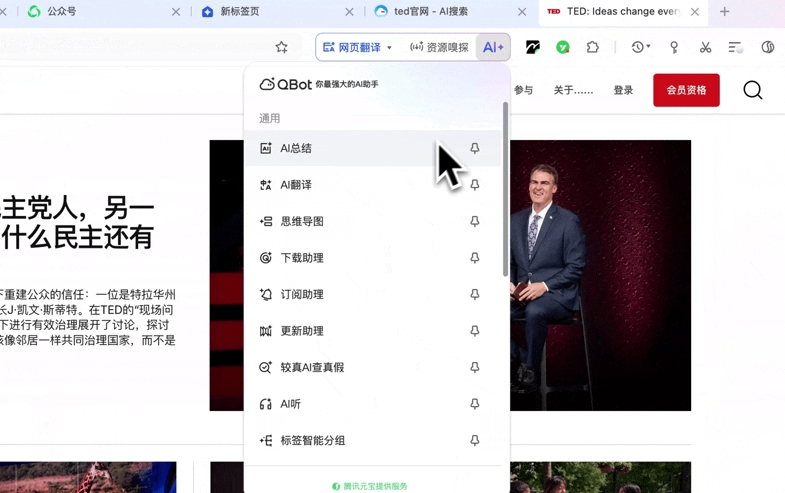
What really sets this update apart is its customization flexibility. Users can pin their favorite tools permanently in the top-right corner and rearrange all functional modules through intuitive drag-and-drop - from AI panels to plugin areas.
AI That Multitasks With You
The upgraded AI+ floating windows represent a leap forward in productivity. Imagine researching foreign articles while simultaneously:
- Having key points summarized
- Building mind maps
- Tracking updates through subscription alerts
Each task runs independently in its own window, eliminating the frustration of constant tab switching. The system even remembers your workflow preferences between sessions.
Fact-checking gets easier too - a new verification tool analyzes suspicious claims with a single click, potentially saving hours of cross-referencing sources.
Taming Tab Chaos
We've all suffered from "tab overload" - that moment when dozens of open pages become an unmanageable mess. QQ Browser's solution? Smart grouping that automatically organizes tabs by content type and domain, functioning like a digital filing system for your browsing session.
When Your Eyes Need a Break
The surprise standout feature might be the new voice reading capability. Perfect for tired eyes or multitasking moments, it converts webpage text (articles, guides, even novels) into natural-sounding speech with adjustable speeds from leisurely to rapid-fire.
The system intelligently switches between podcast-style narration and traditional reading modes based on content type - no jarring transitions when moving between news stories and technical documentation.
Key Improvements:
- Redesigned interface puts essential tools within instant reach
- AI floating windows handle multiple concurrent tasks seamlessly
- Auto-grouped tabs eliminate browsing clutter
- Voice reading offers five adjustable speed levels
- Fact-check tool provides instant credibility assessments


