Microsoft Copilot Expands Free Multi-File Analysis with GPT-5

Microsoft Copilot Unveils Free Multi-File Analysis with GPT-5

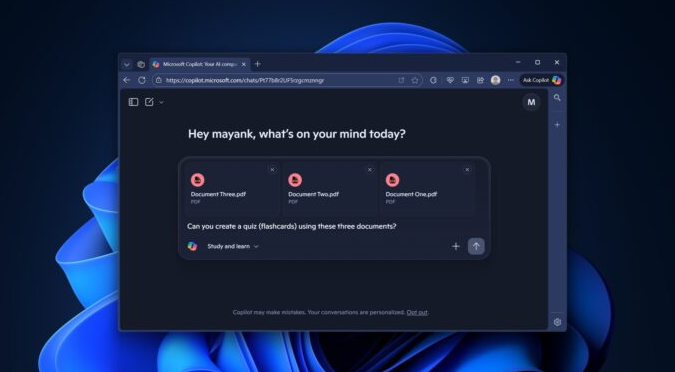
Microsoft has rolled out a significant update to its Copilot AI assistant, introducing free multi-file analysis capabilities for both web and Windows 11 users. This feature, powered by GPT-5, enables simultaneous processing of up to three files—a leap from previous limitations where files couldn't be cross-referenced.
Image

Enhanced Practical Applications

The update addresses a top user request, allowing Copilot to identify relationships between uploaded documents. Practical use cases include:

  • Job applications: Upload a resume and two job postings for tailored advice.
  • Travel planning: Combine budget spreadsheets, itineraries, and packing lists for optimization suggestions.

Free users now gain access to GPT-5's multi-file reasoning—previously exclusive to paid ChatGPT tiers—though with limited message allowances.
Image

New Features Boost Productivity

Learning Mode Integration

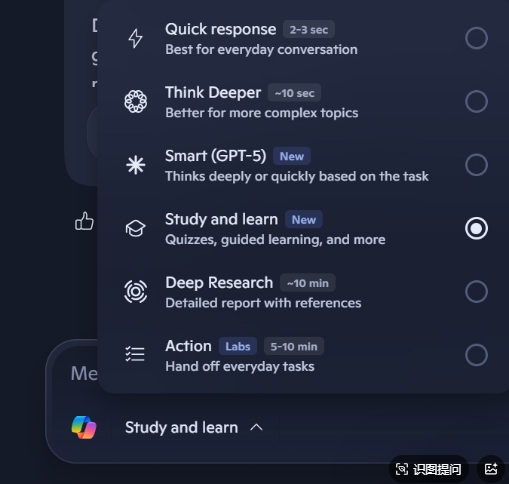
When paired with multi-file support, the new "Learning" mode creates interactive study tools:

  • Generates flashcards from uploaded study materials
  • Provides scored quizzes with detailed explanations
  • Supports book analysis via photos of bookshelves or covers

Advanced Audio Capabilities

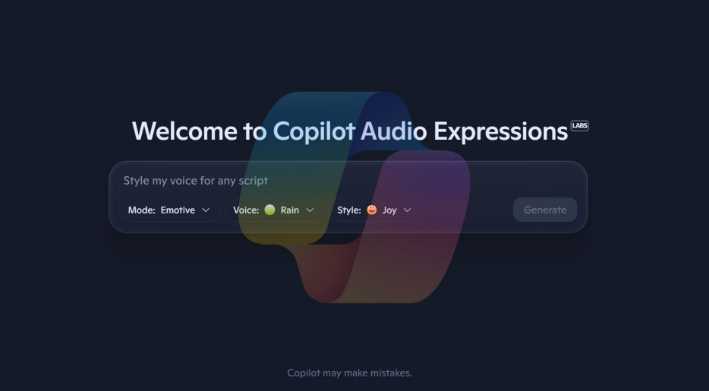
Microsoft's proprietary audio model delivers:

  • More natural voice output than ChatGPT
  • Strong performance in narrative tasks like storytelling
  • Free access to all users

Image

Key Points

  • 🚀 Free multi-file analysis now supports 3 simultaneous uploads with cross-file understanding
  • 💡 Learning mode creates interactive educational content from documents
  • 🎙️ Improved audio offers personalized voice responses at no cost
  • ⏳ GPT-5 features remain limited for free users by message quotas

Enjoyed this article?

Subscribe to our newsletter for the latest AI news, product reviews, and project recommendations delivered to your inbox weekly.

Weekly digestFree foreverUnsubscribe anytime

Related Articles

Tencent's WorkBuddy Now Lets You Control Your PC from WeChat
News

Tencent's WorkBuddy Now Lets You Control Your PC from WeChat

Tencent's AI assistant WorkBuddy just got a major upgrade, allowing users to remotely control their office computers through WeChat. The update introduces mobile voice commands, scheduled tasks, and enhanced security features. Whether you need to pull reports or draft documents, your AI assistant can now handle it anytime, anywhere - even offering 5,000 free credits for new users to try these features.

March 12, 2026
TencentAI ProductivityRemote Work
News

Google's Gemini AI Transforms Workspace Into Your Smart Office Partner

Google has taken workplace productivity to new heights by fully integrating its Gemini AI assistant across Workspace apps. From drafting documents in Docs to crunching numbers in Sheets and designing presentations in Slides, Gemini now acts as a digital colleague that understands context and adapts to your style. Early tests show it can boost spreadsheet efficiency by up to 9 times. Currently rolling out to premium subscribers, this upgrade marks a significant shift from tools that help you work to AI that works with you.

March 11, 2026
Google WorkspaceAI ProductivityDigital Transformation
OpenClaw's Game-Changing Update: GPT-5.4 Support and Smarter AI Agents
News

OpenClaw's Game-Changing Update: GPT-5.4 Support and Smarter AI Agents

The open-source AI project OpenClaw just dropped its biggest update yet, bringing native GPT-5.4 support that outperforms competitors like Claude Code. The 2026.3.7 version introduces revolutionary 'memory hot-swapping' technology, solving long-standing fragmentation issues in smart agents. From coding to stock analysis, this update transforms OpenClaw from a developer's toy into a true virtual employee that never stops working.

March 9, 2026
AI DevelopmentOpenClawGPT-5
Microsoft Edge's New AI Feature Tames Tab Chaos in Seconds
News

Microsoft Edge's New AI Feature Tames Tab Chaos in Seconds

Microsoft Edge has rolled out an AI-powered tab organizer that could be a game-changer for anyone drowning in browser tabs. The feature analyzes page content, groups similar tabs automatically, and even assigns color-coded labels—all in under a second during tests. For professionals juggling dozens of tabs, this might finally bring order to their digital workspace.

February 26, 2026
Microsoft EdgeBrowser FeaturesAI Productivity
News

OpenAI's New Coding Assistant: GPT-5.3-Codex Goes Public

OpenAI has unveiled GPT-5.3-Codex, its latest AI programming assistant now available to all developers. This upgraded model boasts a massive 400K token context window, faster response times, and surprising self-improvement capabilities during training. With flexible pricing and multi-platform access, it promises to revolutionize how developers work with AI assistance.

February 25, 2026
AI programmingOpenAIdeveloper tools
Claude AI Now Works Inside Your Favorite Office Apps
News

Claude AI Now Works Inside Your Favorite Office Apps

Anthropic's new enterprise plugin brings Claude AI directly into Microsoft Office and Slack, eliminating tedious copy-paste workflows. The open-source system allows companies to customize AI assistants while avoiding vendor lock-in. Early adopters like Deloitte are already automating processes with seamless access to corporate data.

February 25, 2026
AnthropicAI ProductivityEnterprise Software