
Firefox Fights Back: New Version Lets Users Block AI Features With One Click

Firefox Takes Stand Against Forced AI Integration

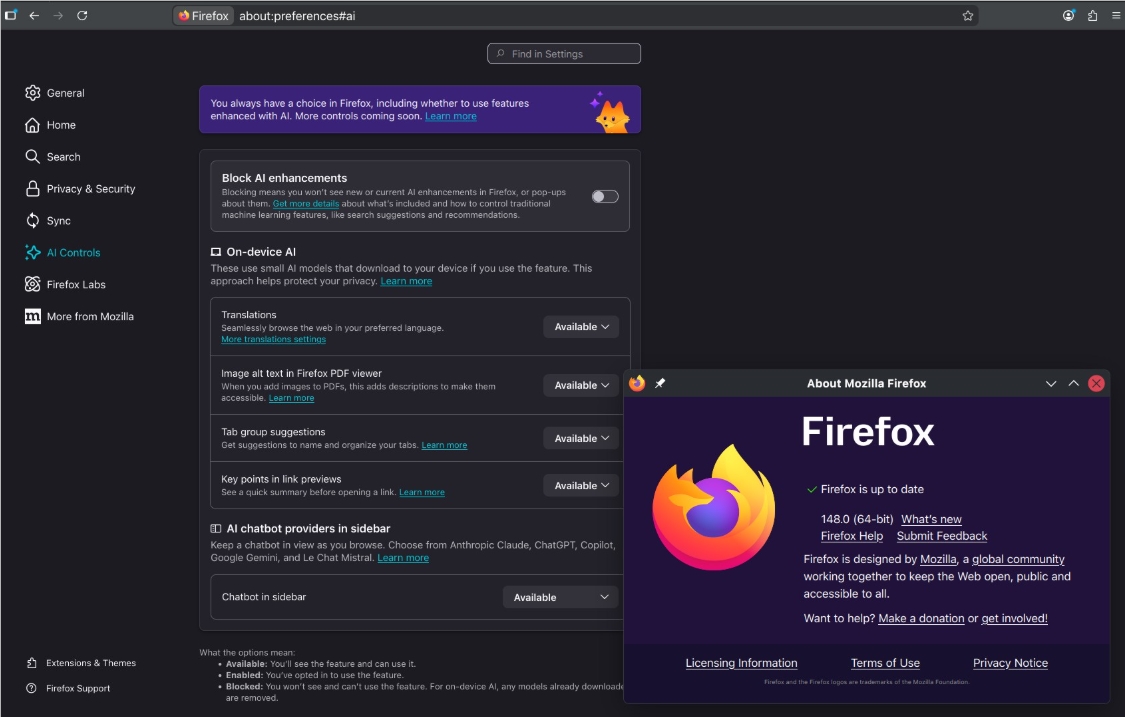
While competitors rush to cram AI into every corner of their browsers, Mozilla is handing control back to users. The newly released Firefox 148 comes with what many are calling an "AI kill switch" - a simple toggle to disable all built-in artificial intelligence features.
Image

Putting Users Back in Control

The tech world has been buzzing about mandatory AI assistants lately, often installed without clear opt-out options. Firefox's solution? A dedicated "AI Control" panel where users can manage - or completely disable - these features with one click. It's a privacy-focused approach that sets Firefox apart in today's crowded browser market.

"We're seeing growing frustration among users who feel forced into AI experiences," explains Mozilla spokesperson Jamie Chen. "Our philosophy has always been about putting people first."

More Than Just an AI Block

The update brings several practical improvements:

  • Fixed image handling: Windows users can now drag images directly from Firefox into Adobe Illustrator without getting frustrating file links instead
  • Expanded translations: Added support for Vietnamese and improved Traditional Chinese translations makes browsing foreign sites smoother
  • Security updates: Critical fixes addressing vulnerabilities discovered since the last release

The timing couldn't be better as concerns grow about how browsers handle personal data with integrated AI tools.

The End of an Era

The update comes with bittersweet news for some users. Firefox 115.33 marks the final security update supporting Windows 7, 8, and 8.1 systems. After February 2026, these older operating systems won't receive any further maintenance from Mozilla.

For those still running outdated machines, upgrading hardware or switching to Windows 10/11 becomes unavoidable soon.

Key Points:

  • User choice: Firefox introduces easy way to disable all built-in AI features
  • Productivity boost: Fixed image drag-and-drop issues on Windows platforms
  • Language support: Added Vietnamese and improved Traditional Chinese translations
  • Security cutoff: Final updates coming for Windows 7/8/8.1 users

Enjoyed this article?

Subscribe to our newsletter for the latest AI news, product reviews, and project recommendations delivered to your inbox weekly.

Weekly digestFree foreverUnsubscribe anytime

Related Articles

Firefox 148 Puts AI Control Back in Your Hands
News

Firefox 148 Puts AI Control Back in Your Hands

Mozilla's Firefox 148 introduces groundbreaking AI features while prioritizing user choice. Unlike competitors forcing AI integration, Firefox offers a simple toggle to disable all artificial intelligence functions. The update brings smart browsing assistants from major providers, productivity tools, and enhanced privacy protections - all optional. Set for February 24 release, this move reinforces Firefox's commitment to putting users first in the AI revolution.

February 4, 2026
FirefoxAI PrivacyBrowser Technology
News

Google Chrome Gets Smarter: Your Browser Just Became an AI Assistant

Google is transforming Chrome from a simple web browser into a powerful AI assistant. The latest update introduces Gemini-powered features right in your sidebar - think real-time shopping comparisons, email summaries, and even trip planning without switching tabs. While these upgrades promise to streamline our digital lives, experts caution about privacy concerns as AI takes on more personal tasks.

February 10, 2026
Google ChromeAI AssistantBrowser Technology
News

Popular Chrome AI Extensions Caught Secretly Harvesting User Data

A startling investigation reveals more than half of Chrome's AI-powered extensions are collecting user data without full transparency. Programming assistants and transcription tools top the list of privacy offenders, with household names like Grammarly and Quillbot raising eyebrows. Experts warn users to scrutinize permission requests before installing these productivity boosters.

February 5, 2026
Browser SecurityAI PrivacyData Protection
ChatGPT's Temporary Chats Get Smarter While Keeping Secrets
News

ChatGPT's Temporary Chats Get Smarter While Keeping Secrets

OpenAI has upgraded ChatGPT's Temporary Chat feature to remember user preferences without storing conversation history. This breakthrough balances personalization with privacy, letting users maintain their style while keeping sensitive chats truly temporary. Alongside this update, OpenAI introduced an age prediction model to filter content for younger users.

January 26, 2026
ChatGPTAI PrivacyOpenAI Updates
News

Nearly a Million Chrome Users Hit by Sneaky AI Chat Thieves

A startling security breach has exposed private conversations from ChatGPT and DeepSeek users through malicious Chrome extensions. Disguised as helpful tools, these add-ons secretly harvested sensitive data from over 900,000 unsuspecting victims. Security experts warn this sophisticated attack could compromise corporate secrets and personal information alike.

January 8, 2026
Chrome SecurityAI PrivacyData Breach
WitNote: The Offline AI Assistant That Keeps Your Notes Private
News

WitNote: The Offline AI Assistant That Keeps Your Notes Private

In an era where data privacy concerns are growing, WitNote emerges as a refreshing solution for secure note-taking. This locally-run AI assistant processes your notes entirely offline, eliminating worries about cloud storage or subscription fees. Supporting both Windows and macOS, it offers text polishing, summarization, and seamless integration with Obsidian - all while keeping your data firmly on your own device. The developer's commitment to privacy even extends to covering Apple's Developer Program fees to ensure smooth installation.

December 30, 2025
AI PrivacyOffline ToolsProductivity Apps