

Adobe's Creative Suite Meets ChatGPT: Edit Photos and Docs with Simple Commands
Adobe Brings Photoshop Magic to ChatGPT Conversations
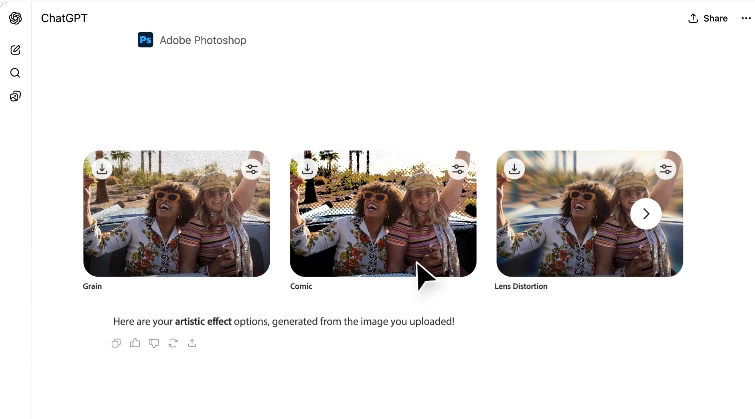
Imagine changing a photo's background as easily as sending a text message. That's the reality Adobe just created by integrating Photoshop, Acrobat, and Express directly into ChatGPT. The move turns the AI chatbot into a versatile creative assistant capable of handling image edits, document tweaks, and graphic design tasks through simple typed instructions.
No More Software Juggling
Gone are the days of constantly switching between apps. "We're removing the friction between idea and execution," explains an Adobe spokesperson. Need to touch up a family photo before sharing? Type "remove red-eye from this image" in ChatGPT. Crafting a flyer for your bake sale? Describe your vision in plain English, and Adobe Express will generate design options using professional templates.
The PDF editing capabilities might be the real game-changer though. Job seekers can now say "make my resume more concise" or "convert this to a two-column layout" without ever leaving their ChatGPT conversation. Early testers report saving hours normally spent wrestling with Acrobat's toolbars.
How It Works
Getting started takes three clicks:
- Open ChatGPT settings
- Select "Apps and Connectors"
- Choose your Adobe tool
Then simply attach your file and type commands like:
- "Crop this photo to square format"
- "Add sunset colors to the background"
- "Combine these three PDFs into one document"
The system even offers a handy slider to fine-tune results after each edit—perfect for when you want something between "subtle" and "dramatic" adjustments.
The Future of AI-Assisted Creativity
This integration represents more than convenience—it signals how AI might reshape creative software. Instead of memorizing complex menus, users express intentions naturally. As one beta tester marveled: "It feels like having a professional designer looking over my shoulder, ready to help."
The rollout includes free basic features, with premium options available for power users. While the tools currently handle straightforward tasks best, Adobe hints at more advanced capabilities coming soon.
Key Points:
- ✨ Photoshop in Chat: Edit images through text commands (remove objects, adjust colors, etc.)
- 📑 Smart PDF Editing: Modify resumes and documents without leaving ChatGPT
- 🎨 Express Designs: Create social media graphics using descriptive prompts
- ⚡ Workflow Boost: Eliminates constant app switching for common creative tasks


